See the details of an audit log entry
Open an entry in the audit log to see what changed, and what the same person did in the minutes around it.
When to use this
- When someone asks exactly what was changed, and what it was before.
- When you find an entry and need to know what the person did just before and after it.
Steps
-
Open Monitors in the menu on the left.

-
Open Audit Log at the top of the page. A list of entries appears, and each row shows who did what and when.

-
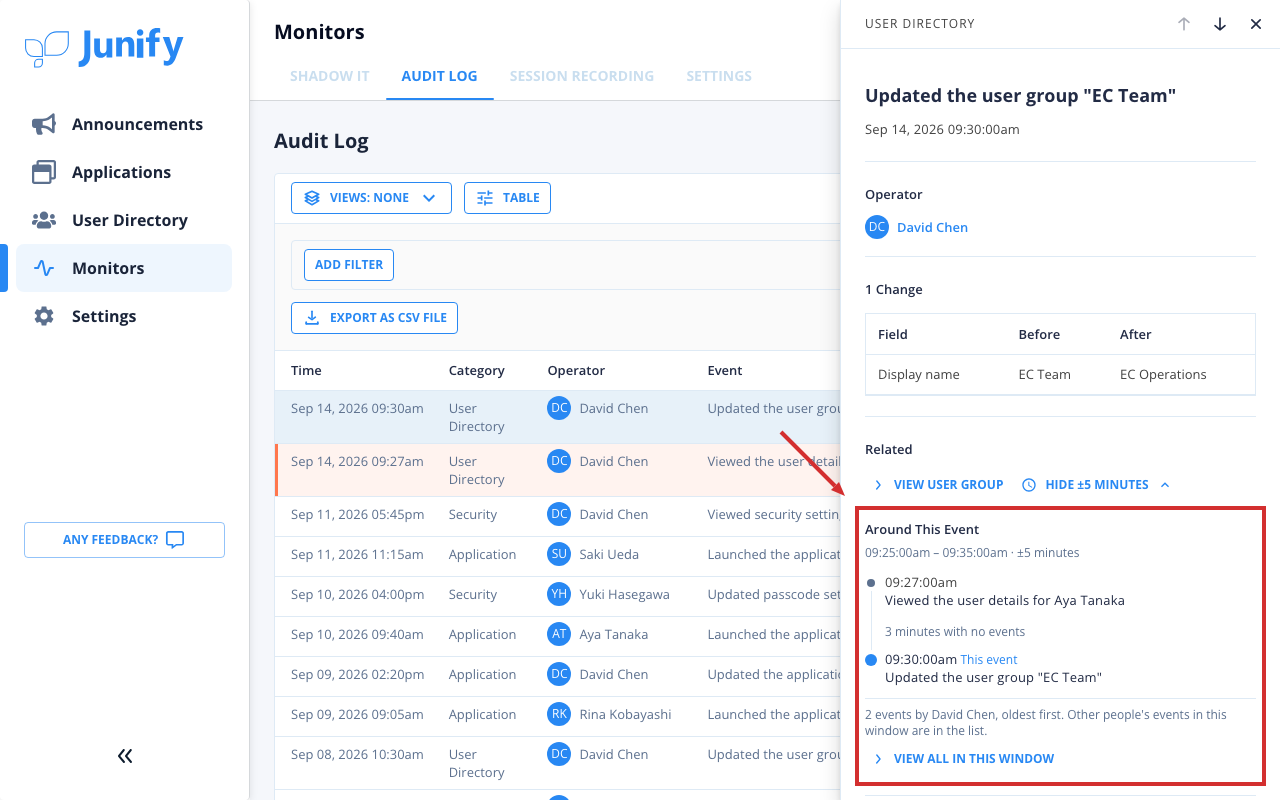
Click the row of the entry you want to check. A panel with the entry’s details opens on the right.

-
Check what changed. Each changed item is listed with its value before and after the change.

-
Below the changes, click Show ±5 Minutes.

-
Check what the same person did in the five minutes before and after the entry. Their entries are listed oldest first.
Things to know
- Show ±5 Minutes appears only for entries that name the person who did them.